OCR vs. Translation Model: Two Steps of Screen Translation
When you use screen translation, you have probably run into this puzzle: the translation looks off, but you cannot tell where the problem lies—did the tool misread the text on screen, or did the translation itself go wrong? The fixes for these two failures are completely different, and once you split "reading" and "translating" into two steps, the picture immediately becomes clear.
Screen Translation Is Two Steps, Not One
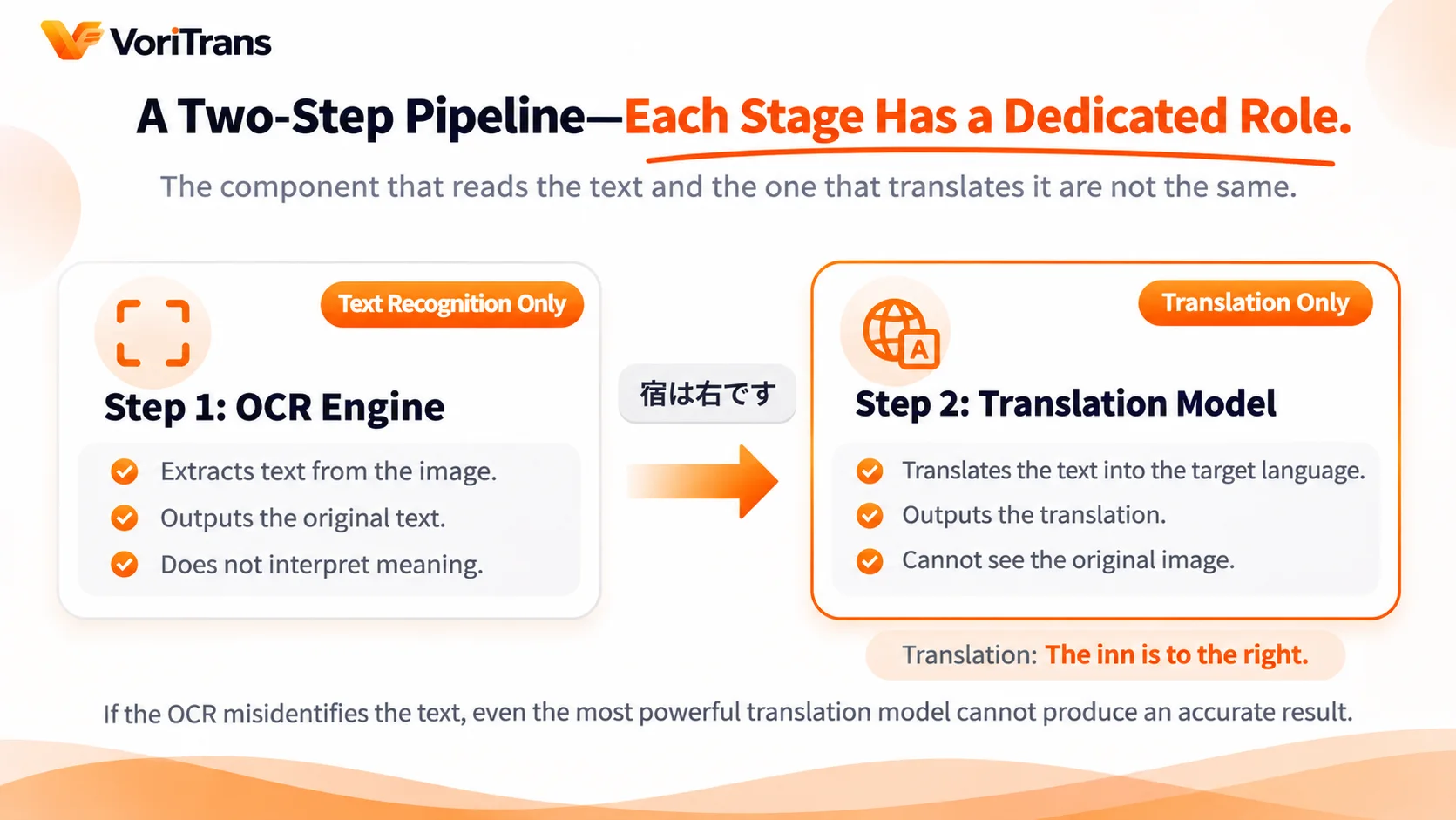
Many people assume screen translation is a black box: a frame goes in, a translation comes out. The actual workflow has two steps, each handled by a different component.
Take VoriTrans as an example. Here is the full chain:
- The OCR engine does the "reading": it converts the image text inside your screen selection into editable text, and what it outputs is the source text—say, the Japanese line 「宿は右です」. This step only recognizes characters; it does not understand meaning.
- The translation model does the "translating": it takes the OCR output and renders it in your chosen target language, and what it outputs is the translation. This step handles language only; it never sees the screen.
The two steps form a pipeline: the input of the translation model is exactly the output of the OCR. Which leads to one crucial takeaway—if the OCR misreads a character, no translation model, however powerful, can translate it correctly. Garbage in, garbage out: an upstream error travels all the way into the translation.
Step One: Why OCR Is Especially Hard on Screens
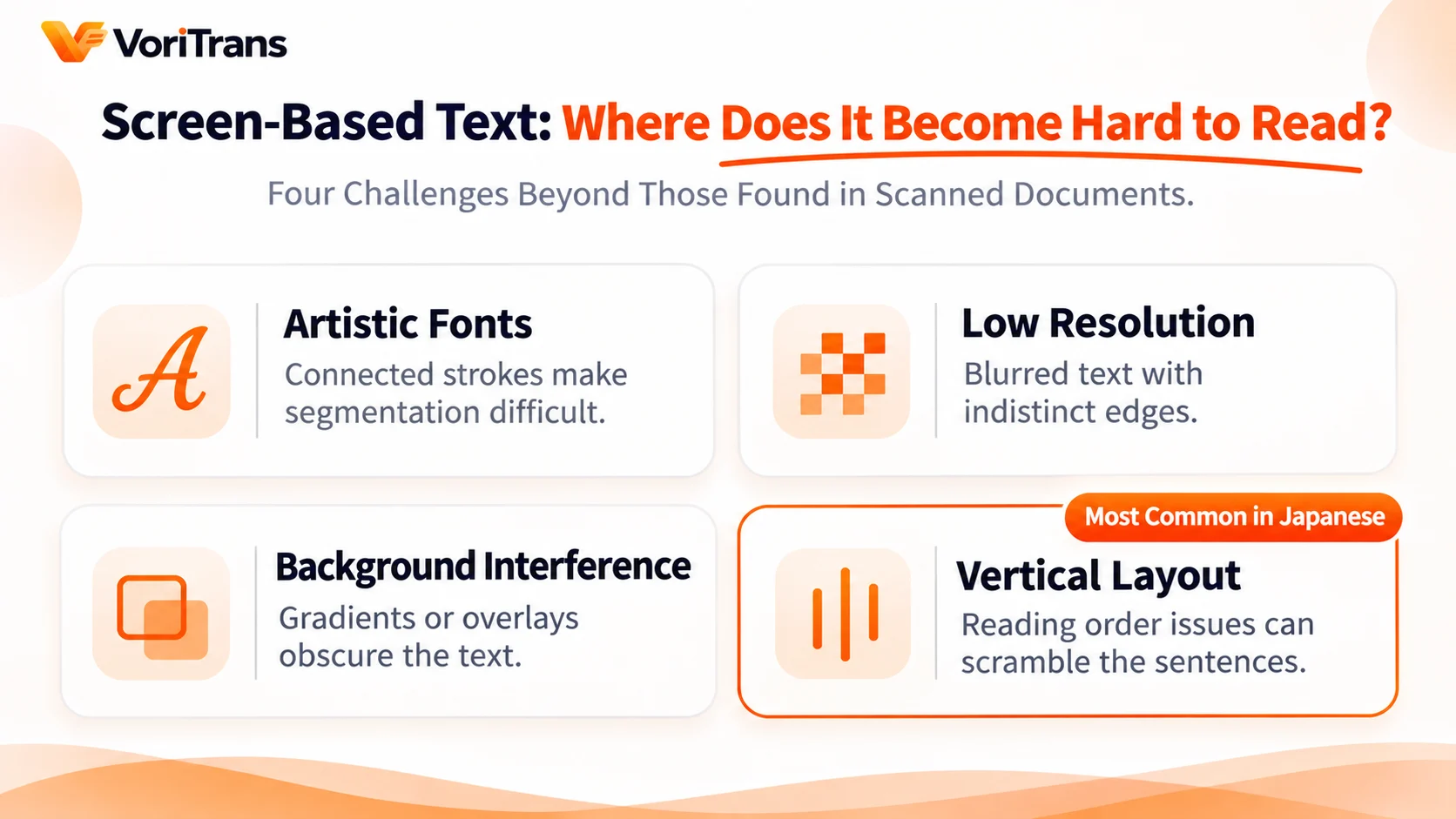
OCR (optical character recognition) is nothing new—scanned documents have long been handled well. But screens are far nastier than scans, and the difficulty all comes from the "picture".
A scanned page is a clean, flat surface: black text on white paper, fixed orientation, uniform font size. A screen frame is nothing like that—text may sit on a gradient background, be covered by a semi-transparent dialogue box, be handwritten or stylized lettering with outlines, or even overlap other visual elements. Vertical Japanese adds another layer: the OCR must know whether to read the right column or the left first, or the sentences come out scrambled.
That is why the tool gives you room to adjust. VoriTrans offers several switchable OCR engines in its preferences, and different engines cope differently with stylized fonts and low-resolution frames; narrowing your selection to just the text area also reduces visual interference. When recognition disappoints, suspect the frame conditions first and the engine second—that order saves you detours.
Step Two: The Translation Model Sets the Ceiling
The source text from the OCR goes to the translation model, and this is where translation quality starts to diverge.
Translation models come in two flavors. Local models run on your own machine: fast responses, no network dependency, and crisp handling of short lines of dialogue—at the cost of limited context understanding; puns, memes and forms of address in games usually get conservative treatment locally. Cloud models (large models like Qwen, DeepSeek and GLM) have far more parameters and clearly do better on long sentences, context and tone, at the cost of credits consumed by usage.
It is worth stressing: a translation model cannot compensate for OCR errors. If the recognized text is missing or garbled, the cloud model receives broken input and the translation goes astray all the same. "Switching to a stronger model" and "fixing recognition" are two different jobs—do not expect the former to solve the latter.
Two Steps, Zero Guesswork: Troubleshooting and Tuning
The practical value of understanding the division of labor shows up in use: you can locate the faulty stage and apply the right fix.
The VoriTrans interface is built around this split—"Recognized Text" and "Translation Result" sit side by side as two panels, so the intermediate output of the recognition stage is directly visible. The troubleshooting rule is simple:
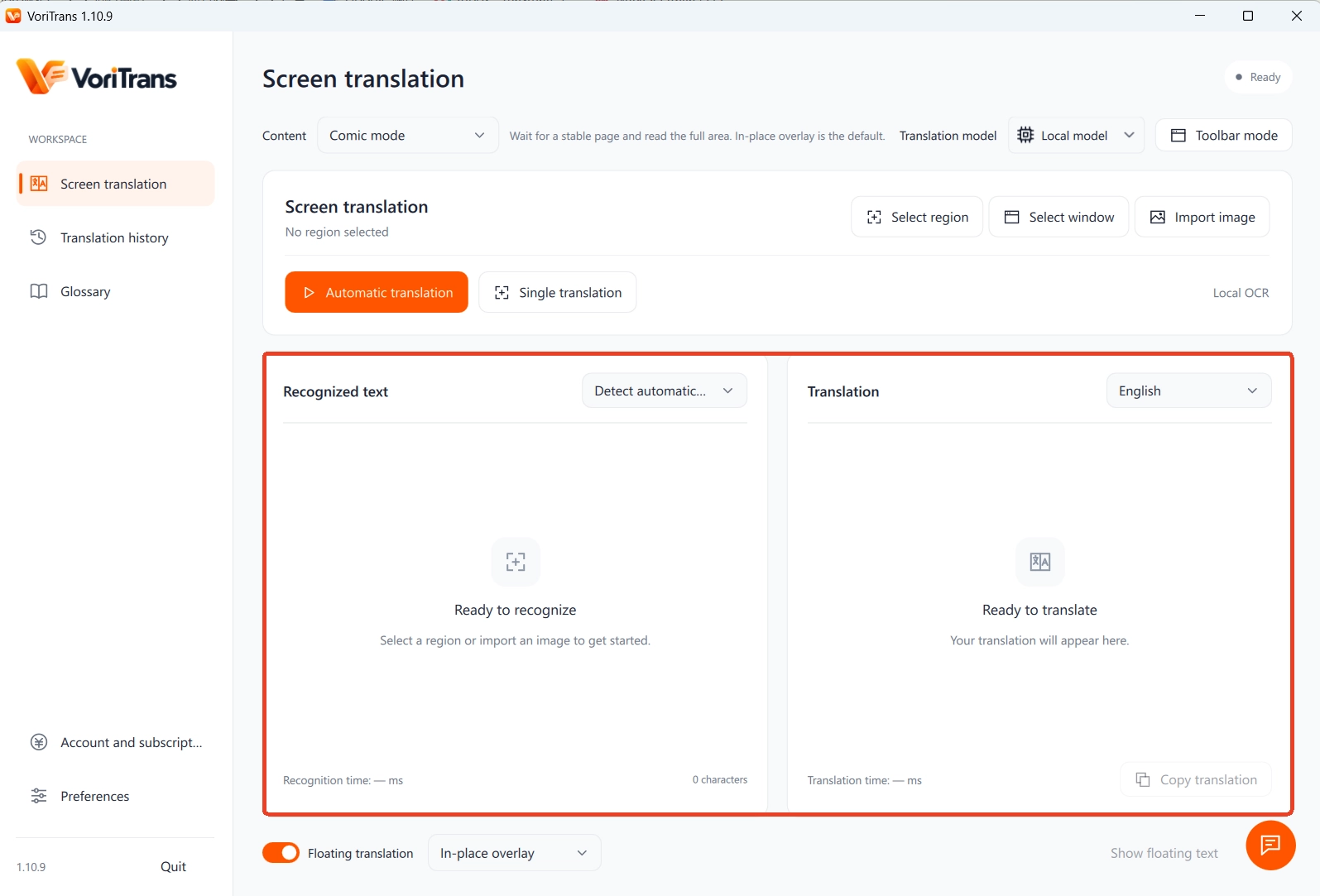
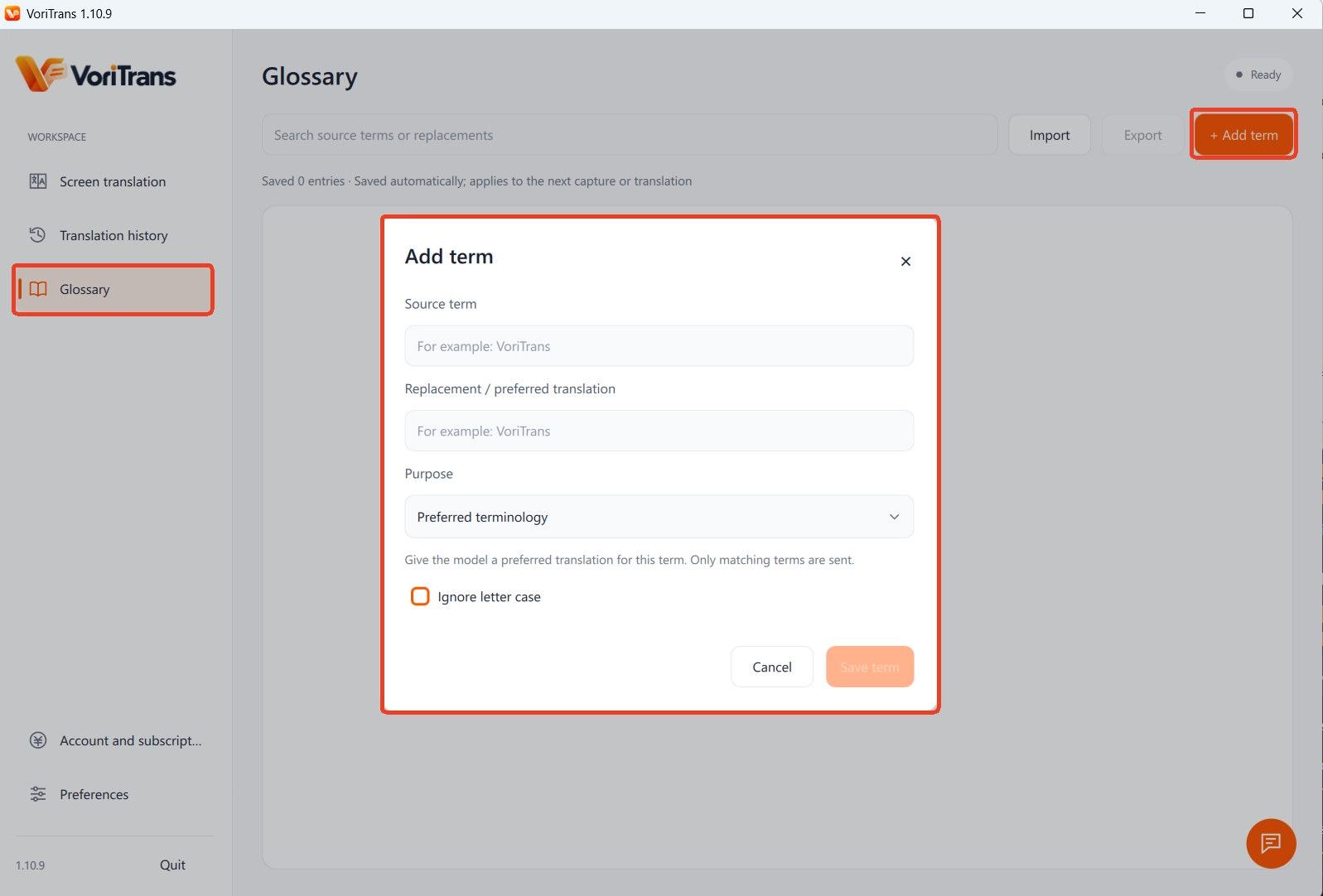
- The source panel is already wrong: the problem is in the OCR. Narrow the selection, switch OCR engines, adjust the frame-stability wait, or add an OCR correction entry (original word → replacement word) to the glossary for error-prone proper nouns—it takes effect automatically on the next translation.
- The source is right but the translation is not: the problem is in the translation model. Translate short texts with both a local and a cloud model and compare; if fixed names (people, places, skill names) come out inconsistent, lock them with a translation rule in the glossary.
A small example: the character name 「ユキ」 occasionally gets recognized as 「ユヌ」, and the translations follow suit. Once 「ユキ」 is set as an OCR correction entry in the glossary, the recognition stage fixes the characters first, and the translation stage then renders it consistently as Yuki—each stage fixes its own problem without interfering with the other. That kind of precision is exactly what the two-step architecture buys you.
One Boundary: The Split Covers Text on Screen
The two-step pipeline applies to text displayed on screen. Spoken lines without subtitles, voice chat, pure audio—there are no characters for the OCR to read, so the translation model has nothing to take over. That is not a matter of model strength; there is simply nothing recognizable at the input.
Once you grasp this, the tool's limits become clear: as long as the text appears in the frame—game dialogue, manga bubbles, hard subtitles, software UI—the two-step pipeline can take over; if the text exists only in sound, you need a different solution. VoriTrans supports 105 target languages; the second step of the pipeline outputs in whichever language you pick, while the recognition side auto-detects the source language.
FAQ
Which fails more often, the OCR or the translation model?
It depends on the scene. With a clean frame and legible fonts, OCR errors are rare; stylized lettering, low resolution and text over busy backgrounds are where recognition struggles most. Start from the Recognized Text panel: only when the source is right is it time to judge the translation model.
Can a stronger translation model make up for recognition errors?
No. The translation model's input is the OCR's output; characters lost or garbled upstream pass through unchanged. The right order is to fix recognition first (selection, engine, OCR correction), then consider upgrading the translation model.
Which step does the glossary work on?
Both. Set as "OCR correction", it fixes characters that the recognition stage keeps getting wrong; set as a "translation rule", it keeps names translated consistently in the translation stage. A single entry can serve only one purpose—choose based on the problem you need to solve.
Next time a translation looks off, do not rush to blame the translator—open the Recognized Text panel and take a look; two seconds is enough to tell which stage failed. Once the division of labor is clear, troubleshooting and tuning screen translation stop being guesswork.