Available
VoriTrans for Windows
VoriTrans 1.10.9 · Windows x64

GET VORITRANS
VoriTrans automatically detects and translates changing on-screen text, replacing the original text with translations right where it appears. Enjoy games, manga, videos, and more without screenshots or switching apps.
 VoriTrans
 1.10.9 · Windows x64
VoriTrans 1.10.9 · macOS arm64
Installers and version information come from official releases.
WHY VORITRANS
A smarter way to understand foreign-language text, directly in the context of what you’re reading.
As new text appears, translations stay up to date without repeated screenshots or manual copy-paste.
AI recognizes the text inside your selected region. The translation replaces the original words, leaving the rest of your screen intact.
Translate on-screen text across 105 supported languages, making games, manga, videos, and more easier to understand.
VoriTrans automatically detects and translates changing on-screen text, replacing the original text with translations right where it appears. Enjoy games, manga, videos, and more without screenshots or switching apps.
PRODUCT PREVIEW
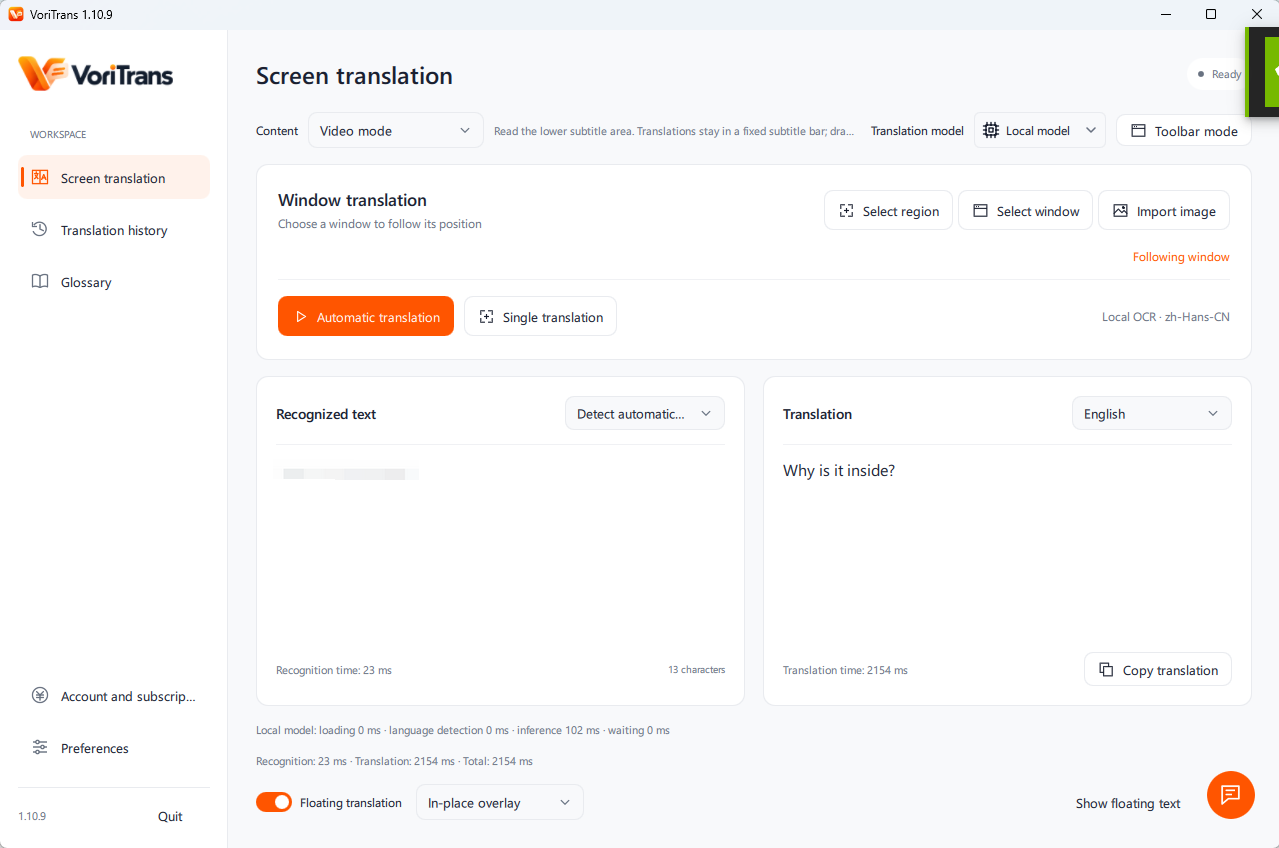
Actual VoriTrans 1.10.9 Windows client in English: region and window selection, automatic translation, and in-place overlay.
GET STARTED
Choose your platform above to download the installer.
Choose your platform above to download the installer.
Follow the verified installation instructions and open VoriTrans.
Choose your languages, select a screen region, and let VoriTrans translate changing text automatically.
Choose your platform above to download the installer.
2026-11-05
SHA-256 a6f7fbc04e803a4f3e76c0eb0727d45da25c4abc35c81d03b50492a6a39ade8d
FAQ
A closer look at VoriTrans.
Yes. Free accounts receive monthly credits for local translation. Paid members use local models without spending credits and can use cloud models with credits. See Pricing for plans and credit rules. All prices are in USD.
See the installation instructions.
Yes. Automatic text-change detection and continuous translation are core VoriTrans capabilities. When new text appears, the translation updates so you can keep reading without repeated screenshots or copy-paste.
VoriTrans supports 105 language options. Explore the Supported Languages section above for the full list, including separate Chinese options for Mainland China, Hong Kong SAR, and Taiwan.
Connection requirements depend on the translation services used by the final client. Offline translation has not been confirmed. We will publish the requirements with the release.
1.10.9 · 2026-11-05